Implement a function for each of following problems

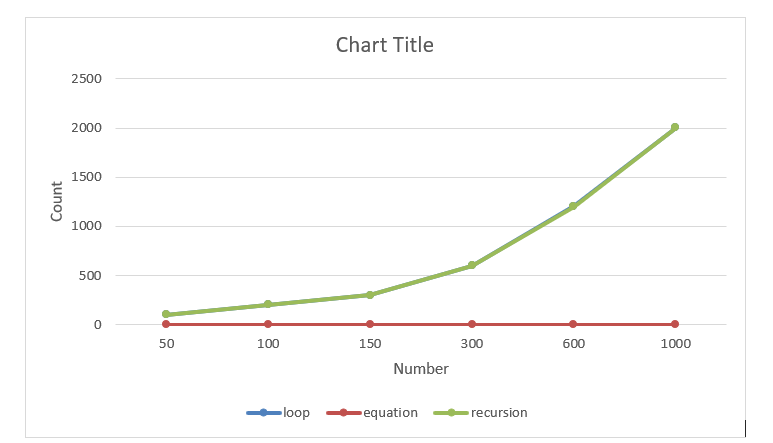
Implement a function for each of following problems and count the number of steps executed/Time taken by each function on various inputs and write complexity of each function. Also draw a comparative chart. In each of the following function N will be passed by user.

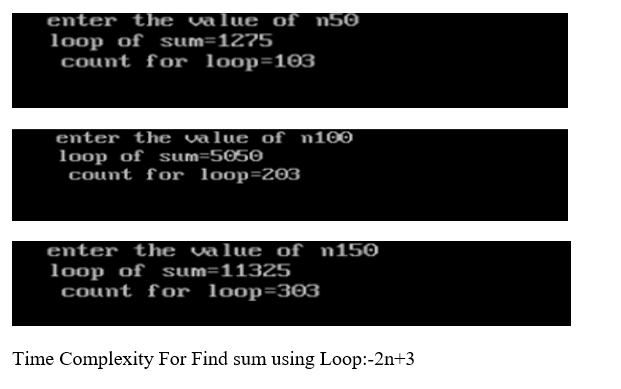
 1. To calculate sum of 1 to N number using loop

CODE:

#include<stdio.h>

#include<conio.h>

void loop(int n);

void main()

{

int n;

clrscr();

printf(“enter the value of n”);

scanf(“%d”,&n);

loop(n);

getch();

}

void loop(int n)

{

int count=0;

int i, sum=0;

count++;

for(i=1;i<=n;i++)

{

   count++;

   sum=sum+i;

   count++;

}

count++;

count++;

printf(“loop of sum=%d”,sum);

printf(“\n count for loop=%d”,count);

}

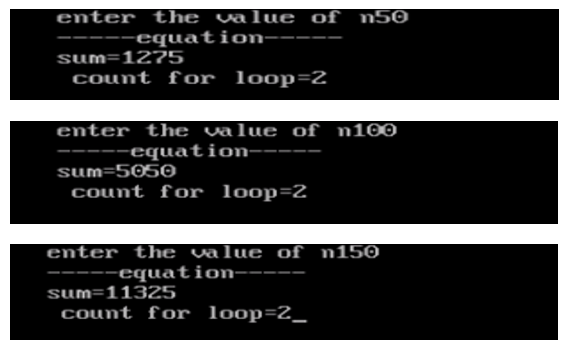
2. To calculate sum of 1 to N number using equation.

CODE:-

#include<stdio.h>

#include<conio.h>

void equation(int n);

void main()

{

int n;

clrscr();

printf(“enter the value of n”);

scanf(“%d”,&n);

equation(n);

getch();

}

 void equation(int n)

 {

   int sum,count=0;

   count++;

   sum=n*(n+1)/2;

   count++;

   printf(“—–equation—–\n”);

   printf(“sum=%d”,sum);

   printf(“\n count for loop=%d”,count);

 }

OUTPUT:

Time Complexity For Find sum using Equation:-2

3. To calculate sum of 1 to N numbers using recursion.

CODE:

#include<stdio.h>

#include<conio.h>

int recursion(int n);

int count=0;

void main()

{

int n;

clrscr();

printf(“enter the value of n”);

scanf(“%d”,&n);

printf(“recursion sum=%d\n”,recursion(n));

printf(“count=%d”,count);

getch();

}

int recursion(int n)

{

 count++;

 if(n==0)

 {

 count++;

 return 0;

 }

 else

 {

  count++;

  return (n+recursion(n-1));

  }

 }

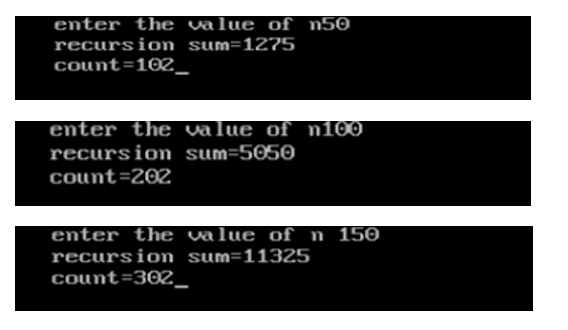
OUTPUT:

Time Complexity For Find sum using Recursion:-2n+2

Number Loop Equation Recursion
50 103 2 102
100 203 2 202
150 303 2 302
300 603 2 602
600 1203 2 1202
1000 2003 2 2002


Computer Network

A computer network is a set of computers connected together for the purpose of sharing resources. The most common resource shared today is connection to the Internet. Other shared resources can include a printer or a file server. The Internet itself can be considered a computer network.

Computer Network Defined

computer network is a set of connected computers. Computers on a network are called nodes. The connection between computers can be done via cabling, most commonly the Ethernet cable, or wirelessly through radio waves. Connected computers can share resources, like access to the Internet, printers, file servers, and others. A network is a multipurpose connection, which allows a single computer to do more.

Types of Network Connections

Computer networks can be broken down historically into topologies, which is a technique of connecting computers. The most common topology today is a collapsed ring. This is due to the success of a network protocol called the Ethernet. This protocol, or network language, supports the Internet, Local Area Networks, and Wide Area Networks.

Star Topology

star topology is a design of a network where a central node extends a cable to each computer on the network. On a star network, computers are connected independently to the center of the network. If a cable is broken, the other computers can operate without problems. A star topology requires a lot of cabling.

Bus Topology

bus topology is another type of design where a single cable connects all computers and the information intended for the last node on the network must run through each connected computer. If a cable is broken, all computers connected down the line cannot reach the network. The benefit of a bus topology is a minimal use of cabling.

Ring Topology

A similar topology is called a ring. In this design, computers are connected via a single cable, but the end nodes also are connected to each other. In this design, the signal circulates through the network until it finds the intended recipient. If a network node is not configured properly, or it is down temporarily for another reason, the signal will make a number of attempts to find its destination.

collapsed ring is a topology where the central node is a network device called a hub, a router, or a switch. This device runs a ring topology internally and features plugins for cables. Next, each computer has an independent cable, which plugs into the device. Most modern offices have a cabling closet, or a space containing a switch device that connects the network. All computers in the office connect to the cabling closet and the switch. Even if a network plug is near a desk, the plug is connected via a cable to the cabling closet.

Differences between Procedural and Object Oriented Programming

Procedural Programming:
Procedural Programming can be defined as a programming model which is derived from structured programming, based upon the concept of calling procedure. Procedures, also known as routines, subroutines or functions, simply consist of a series of computational steps to be carried out. During a program’s execution, any given procedure might be called at any point, including by other procedures or itself.

Languages used in Procedural Programming:


Object Oriented Programming:
Object oriented programming can be defined as a programming model which is based upon the concept of objects. Objects contain data in the form of attributes and code in the form of methods. In object oriented programming, computer programs are designed using the concept of objects that interact with real world. Object oriented programming languages are various but the most popular ones are class-based, meaning that objects are instances of classes, which also determine their types.

Languages used in Object Oriented Programming:

Difference between Procedural Programming and Object Oriented Programming:

PROCEDURAL ORIENTED PROGRAMMINGOBJECT ORIENTED PROGRAMMING
In procedural programming, program is divided into small parts called functions.In object oriented programming, program is divided into small parts called objects.
Procedural programming follows top down approach.Object oriented programming follows bottom up approach.
There is no access specifier in procedural programming.Object oriented programming have access specifiers like private, public, protected etc.
Adding new data and function is not easy.Adding new data and function is easy.
Procedural programming does not have any proper way for hiding data so it is less secure.Object oriented programming provides data hiding so it is more secure.
In procedural programming, overloading is not possible.Overloading is possible in object oriented programming.
In procedural programming, function is more important than data.In object oriented programming, data is more important than function.
Procedural programming is based on unreal world.Object oriented programming is based on real world.
Examples: C, FORTRAN, Pascal, Basic etc.Examples: C++, Java, Python, C# etc.

Jio Plans

What Subscriber Gets In Reliance Jio’s Rs. 198, Rs.398, Rs. 448, Rs. 498 Plans

Reliance Jio, the telecom company led by Mukesh Ambani, offers prepaid recharge plans with various data benefits. The telecom operator also offers unlimited calling benefits across all its prepaid recharge plans. These plans offer up to 5GB per day data which can be chosen by users as per their need. Jio offers four prepaid recharge plans that offer 2 GB of data per day. These prepaid recharge plans of Jio are priced at Rs. 198, Rs. 398, Rs. 448, and Rs.498.  

Jio’s Rs. 198 recharge plan

Under Reliance Jio’s Rs. 198 recharge plan, Jio subscribers can use 2GB of high speed internet data for a period of 28 days. Along with high speed internet data, Jio subscribers get free voice calls and unlimited SMSes (100 SMSes per day), according to the information available at jio.com.

Jio’s Rs. 398 recharge plan

Under Rs. 398 recharge plan, Jio subscribers can use 2GB of high speed internet data per day for 70 days. Along with high speed internet data, Jio subscribers get free voice calls and unlimited SMSes (100 SMSes per day).

Jio’s Rs. 448 recharge plan

Under Reliance Jio’s Rs. 448 recharge plan, Jio customers get access to 2GB of high speed internet data per day for a period of 84 days. Along with high speed internet data, Jio subscribers get free voice calls and unlimited SMSes (100 SMSes per day), according to the information available at jio.com.

Jio’s Rs. 498 recharge plan

Under Jio’s Rs. 498 recharge plan, users get access to 2GB of high speed internet data per day for a period of 91 days. Along with high speed internet data, Jio subscribers get free voice calls and unlimited SMSes (100 SMSes per day)

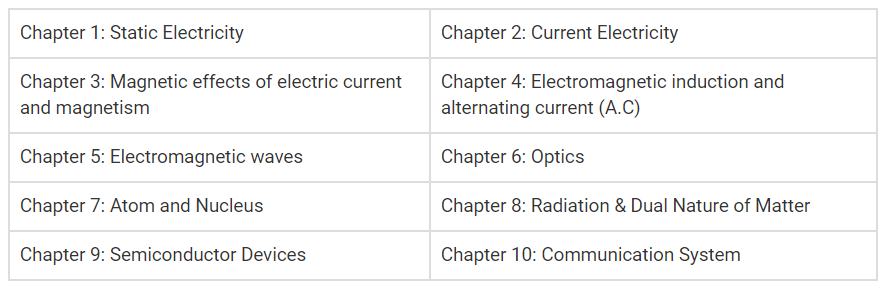
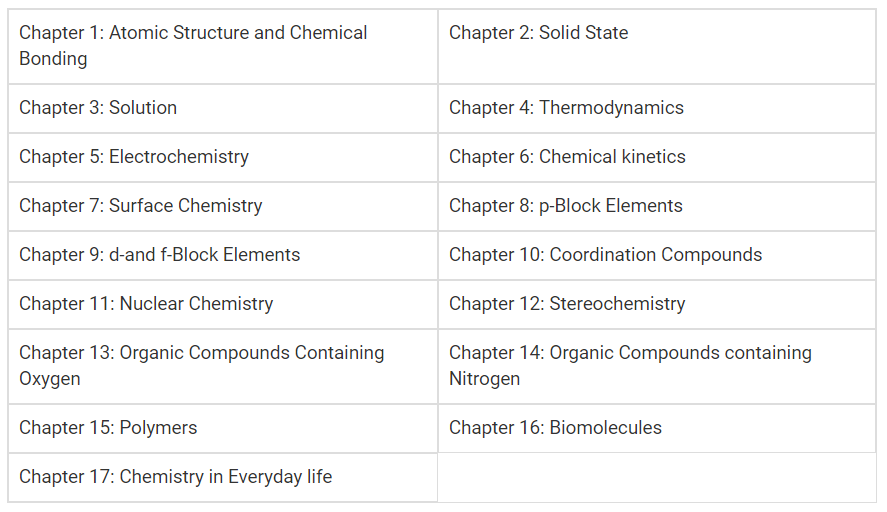
GSEB Std 10 & 12 Syllabus

The Gujarat Secondary and Higher Secondary Education Board shortly known as GSEB is a state government body which is responsible for conducting exams, designing of GSEB syllabus, research, and development in the state of Gujarat. Students who are going to appear in SSC and HSC Gujarat board examination can check the GSEB new syllabus which is given below.

The Gujarat Board conducts the SSC board and HSC board examination for class 10 and class 12 to examine the knowledge and academic progress of students and promote them to a higher level. Students are advised to get familiar with the GSEB syllabus details thoroughly before starting preparing for the examination.

The syllabus is one of the most important element to prepare for an exam. Here is the entire syllabus of Gujarat Secondary Education Board (Class X) and HSC (Class XII) examination. Students should check the entire GSEB new syllabus carefully and start preparing for their exam.

GSEB Std 10 Syllabus

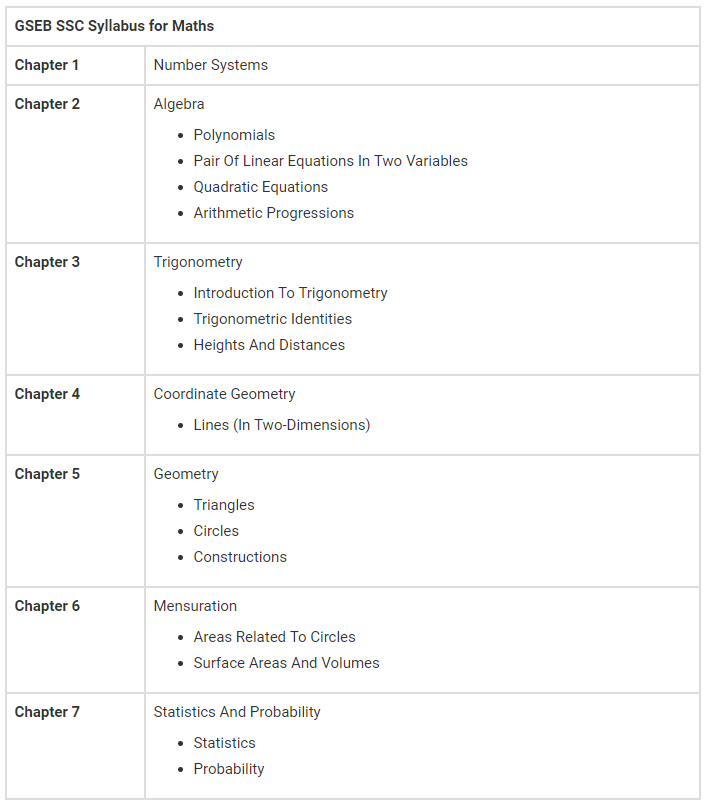
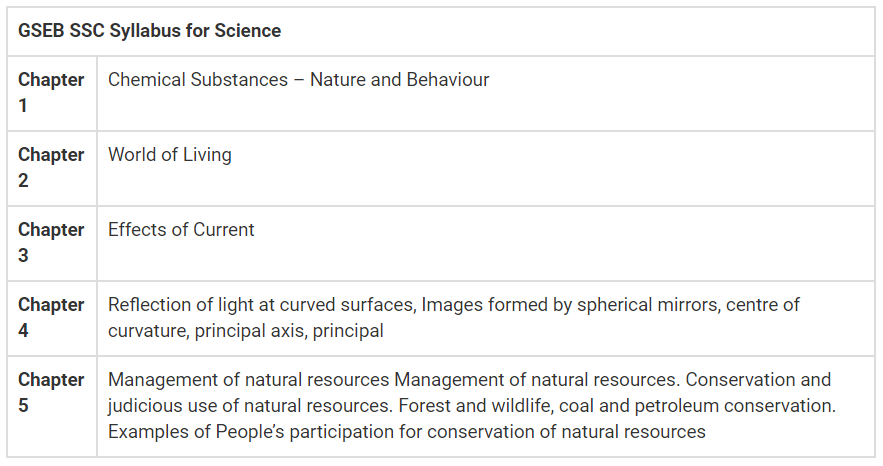
We have provided the GSEB SSC syllabus for Science and Mathematics in the table given below.

GSEB Class 10 math syllabus:

GSEB Class 10 Science syllabus:

GSEB Std 12 Syllabus

We have provided the GSEB HSC syllabus for Science and Mathematics in the table given below.

GSEB HSC Physics Syllabus:

GSEB HSC Biology Syllabus:

GSEB HSC Chemistry Syllabus:

GSEB HSC Math Syllabus:

Commerce Subjects in 11th Class

commerce subjects, commerce subjects class 11, commerce stream, subjects in commerce

Go through this comprehensive list that contains the primary commerce subjects that you will come across in class 11th if you choose the commerce line.

So, we are highlighting the common ones that are a crucial part for a commerce student.

However, the compulsory as well as the optional subject choices may slightly vary as per the specific board i.e. CBSE, ICSE or any other board as applicable.

Moreover, you should check beforehand with the college or university regarding the subjects.

You basically have to study 5 main subjects comprising of 4 compulsory subjects and 1 optional subject. In some cases, you can also opt for a 6th subject, if you really wish to do so.ALSO READ  Best Distance Education University in India: Top List 2019

Compulsory Subjects in 11th Commerce:

1. Accountancy:

Accountancy is the basis or we can say the stepping stone to enter in the field of commerce. Not only in the 11th standard, but if you establish a career in commerce, Accountancy is going to be an indispensable component of your entire study. Further, accounting shall be an integral part of your 12th commerce subjects list as well.

You shall start off with an introduction to accounting, meaning, useful terms, basic accounting principles and concepts, golden rules of accounting, debits and credits, financial accounting and so on.

Accountancy includes theoretical as well as numerical part, the later one being a highly scoring component in the examinations. In fact, this is the most interesting subject for a commerce student. You shall become well versed with the ways to analyse and represent the financial information of a business entity.

As you climb up the ladder of success, in your graduation or any other professional courses after graduation, accountancy shall be an integral part of your curriculum.

2. Economics:

Economics is a vast subject covering details on the country’s economy, economic development over the years. It further deals with the production, distribution and consumption of various goods and services. The concepts of demand and supply, privatisation, globalisation and comparative development of various sectors shall be broadly discussed.

Although, a theoretical subject but consists of meaningful charts, graphs, statistical data to support different events and occurrences. You shall be get to know about Micro-economics and Macro-economics as you step ahead in your career.

*Statistics:

Just mentioning this separately, it’s generally a part of Economics subject wherein you deal with collection, presentation and statistical analysis of numerical data. Concepts like sampling, mean, median, mode, variance, standard deviation etc. shall be studied. Statistical formulas, graphs and numerical problem solutions is what you shall primarily cover up in this portion.ALSO READ  Courses after B.Com: Best Career options for commerce graduates

3. Business Studies/Organisation of Commerce:

This shall give you an in-depth information on business, its objectives, nature, scope and types of business. You shall also become aware of useful business related concepts and the diversified corporate culture. You get to know various details about the operations and organisation of business entities. This acts as a base to understand how different business activities impact the society and the overall economy.

In 11th commerce you may deal with limited set of business features and details. But, as you move further in your 12th standard and graduation in commerce, you will explore a set of wider details on numerous business topics.

4. English:

English core is usually a compulsory part of your course. Rest it depends upon the state board/university you are pursuing your education from, CBSE, ICSE and ISC has it. Some state boards don’t have English as a compulsory subject. Moreover, if you have selected medium other than English, then of course, this won’t be compulsory.

If you make yourself well acquainted with all the subjects at an initial stage, this shall be a guiding map for choosing the best course after 12th commerce.

Optional Subjects in Commerce:

  • Mathematics
  • Physical Education
  • Information Technology
  • Entrepreneurship
  • Psychology
  • Hindi
  • Music
  • Painting etc.

Just select the optional subject based on your calibre and interest. Choose what you like and not what your friend likes!

Important: We have listed few common optional choices. However, the optional subjects may vary as per the school education board. So, kindly check beforehand as to which subjects are available in a particular school/college.

Commerce Stream: A Final Take

Commerce is not as easy as people actually believe it to be. Also, it is not as difficult as it might seem to you. It’s just that you have to put in consistent efforts to actually get the desired results.ALSO READ  Top Universities for Accounting and Finance in the World: Best Rankings

Whichever career field you select, make sure you keep all your basics clear that shall guide you throughout your life.

Initially, some subjects might be totally new and unknown for you. But, don’t worry if you have the passion to carry on and build a successful career, you are surely going to succeed. With the passage of time you and once you engross yourself in the commerce stream, you shall become completely familiar with all these commerce subjects.

HTML Editor

Write HTML Using Notepad or TextEdit

  • Web pages can be created and modified by using professional HTML editors.
  • However, for learning HTML we recommend a simple text editor like Notepad (PC) or TextEdit (Mac).
  • We believe using a simple text editor is a good way to learn HTML.
  • Follow the steps below to create your first web page with Notepad or TextEdit.

Step 1: Open Notepad (PC)

Windows 8 or later:

  • Open the Start Screen (the window symbol at the bottom left on your screen). Type Notepad.

Windows 7 or earlier:

  • Open Start > Programs > Accessories > Notepad

Step 1: Open TextEdit (Mac)

  • Open Finder > Applications > TextEdit
  • Also change some preferences to get the application to save files correctly. In Preferences > Format > choose “Plain Text”
  • Then under “Open and Save”, check the box that says “Display HTML files as HTML code instead of formatted text”.
  • Then open a new document to place the code.

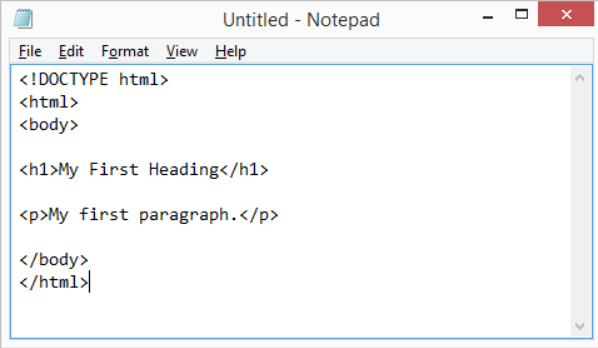
Step 2: Write Some HTML

  • Write or copy some HTML into Notepad.

Step 3: Save the HTML Page

  • Save the file on your computer. Select File > Save as in the Notepad menu.
  • Name the file “index.htm” and set the encoding to UTF-8 (which is the preferred encoding for HTML files).

Step 4: View the HTML Page in Your Browser

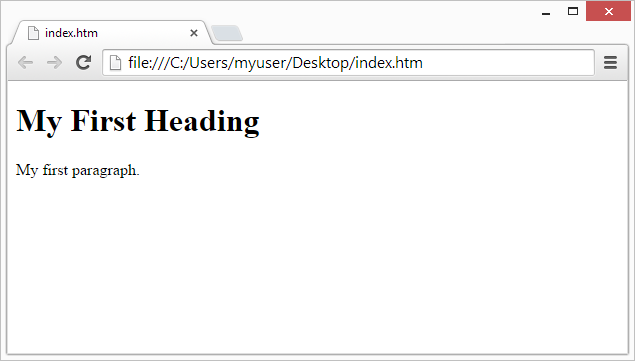
  • Open the saved HTML file in your favorite browser (double click on the file, or right-click – and choose “Open with”).
  • The result will look much like this:
View in Browser